 Since 2006
GridBuddy: the world’s easiest spreadsheet
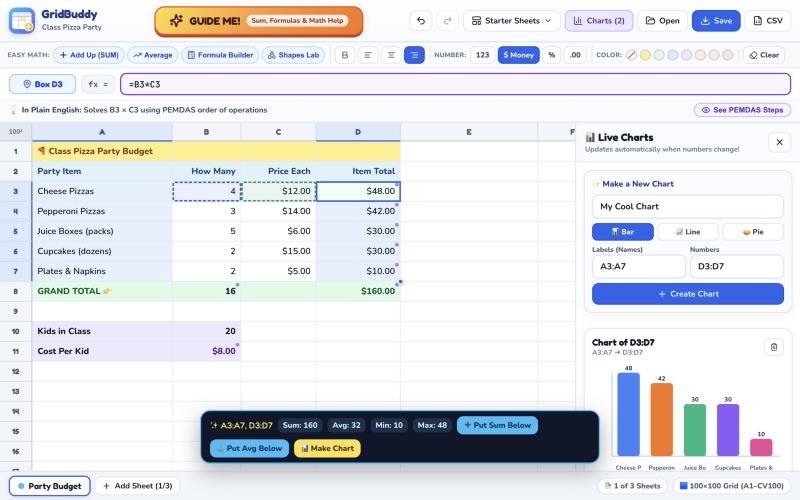
Meet GridBuddy, which I’m calling the world’s easiest spreadsheet. It’s made for grade schoolers and anybody who has ever opened a spreadsheet, stared at all those little boxes and closed it again. You don’t need to know anything going in.
Try it right now in your browser. It’s free, there’s nothing to install and no account, and your sheet stays on your own computer.
What makes it easy
- A giant Guide Me button. It walks you through adding things up, averages, biggest and smallest, right on the grid. There’s also a formula builder made of colorful math bricks, a shapes lab with pictures that drops area and volume formulas into your sheet, and 60-second practice missions that end in confetti.
- Formulas in plain English. Click any box with a formula and a line under the formula bar tells you what it does, like “Adds up all the numbers in D3:D7”.
- See PEMDAS Steps. One click shows how a formula gets solved: parentheses, then exponents, then multiply and divide, then add and subtract, one step at a time. Great for homework checking.
- Friendly mistakes. Instead of #DIV/0! you get “Can’t ÷ 0”, and a box that points back at itself just says “Loop!”.
- Highlight and go. Drag across some numbers and a bar pops up with the sum, average, smallest and biggest, plus one-click buttons to put a Sum or Average underneath or make a chart. Hold ⌘ on a Mac (Ctrl on Windows) and click to pick boxes that aren’t next to each other. Pick a column of names and then a column of numbers and Make Chart turns them into a live bar chart.
- Math, geometry and statistics only. About 40 functions, from SUM and AVERAGE to area of a circle, the Pythagorean theorem, volume of a cone, median, mode and standard deviation. No banking or database stuff to get lost in.
It starts you off with a Class Pizza Party budget to poke at, and the Starter Sheets menu has a fresh blank sheet at the top plus game scores, a geometry lab and a two-sheet lemonade stand. You get up to three sheets of 100 by 100 boxes, live bar, line and pie charts, crayon fill colors, undo, and you can save your work to a file or export it as CSV for a “real” spreadsheet.
New: a free Zero to Hero lesson plan
If you’ve never touched a spreadsheet, or you’re a parent or teacher who wants to hand GridBuddy to a kid with a plan, there’s now a colorful 19-page lesson plan that goes from “what’s a box?” all the way to running a two-sheet lemonade stand business with charts. It’s 11 short levels of 15 to 30 minutes each, and every level has a Try It! exercise, a Hero Tip and a quick Check Yourself question. It uses GridBuddy’s Guide Me wizards and all four practice missions along the way, so you learn by clicking, not by reading. At the back there’s a printable cheat sheet (shortcuts, favorite formulas and what each friendly error message means), a kid-friendly dictionary, an answer key and a badge tracker to tick off. Work through the first five levels in an afternoon and you’ll be adding, averaging and making charts on your own.
- Download the lesson plan (PDF), ready to print or read on screen.
- Download the editable version (Word .docx) to change the exercises, add your own class projects or translate it. It opens in Word, Pages, LibreOffice and Google Docs.
Everything it teaches works in Excel and Google Sheets too, so it’s a friendly on-ramp to the “real” ones.
It’s built for a computer with a keyboard and mouse. It works on a phone, but it’s cramped. Go make something add up: navesink.net/gridbuddy.